

⚠️7 reasons your AI video breaks continuity
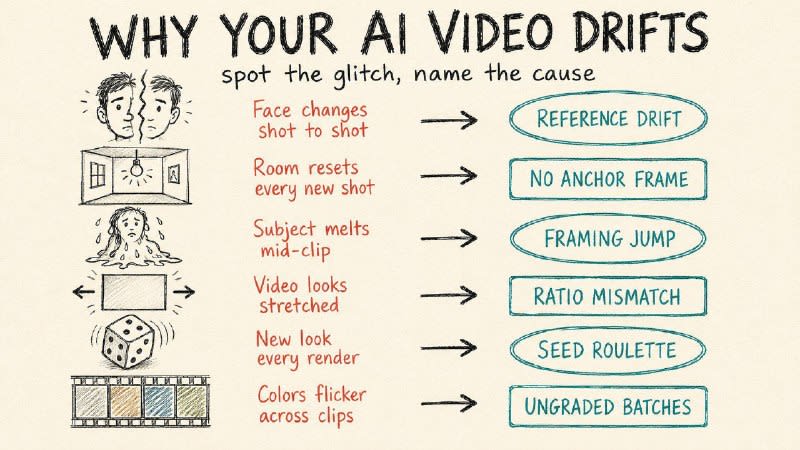
⚠️7 reasons your AI video breaks continuity. Your character changes face by shot three. Each one has a 30-second fix. 1. Lock one reference image. Pick a single high-quality portrait, crop it tight to 60-80% of the frame, and feed that exact file into every shot. The drift starts the moment you swap references between generations. 2. Use your last frame as the next first frame. Save the final frame of each clip and upload it as the opening frame of the next. Lighting, location, and props carry over instead of resetting to a fresh guess. 3. Keep first and last frames close in framing. Jumping from a wide shot to an extreme close-up forces the model to invent a camera move it can't do, and you get a smeared morph. Move medium to medium-close, or move the subject inside the same frame. 4. Match the frame's aspect ratio to the output. Upload a 16:9 still but render to 9:16, and the model stretches to fill. Set both to the same ratio before you generate. 5. Reuse the seed from your best take. When one generation nails the look, lock its seed and regenerate with small prompt tweaks. Random seeds hand you a different face every run. 6. Grade every clip to one reference. Clips from different batches drift in color temperature and contrast even when the character holds. Pull them all to a single grade in your editor, trim the unstable half-second at each clip's head and tail, and drop short cross-dissolves over the cuts that still jump. 7. Stop stuffing one prompt with five actions. Short clips can't hold a full sequence, so the model rushes and breaks. Use a multi-shot storyboard like Kling 3.0 or Seedance 2.0, or sequence shots with [cut] markers that share the same reference images. @aipost 🏴